Telegram Download Disabled on a Channel? Here's the Workaround
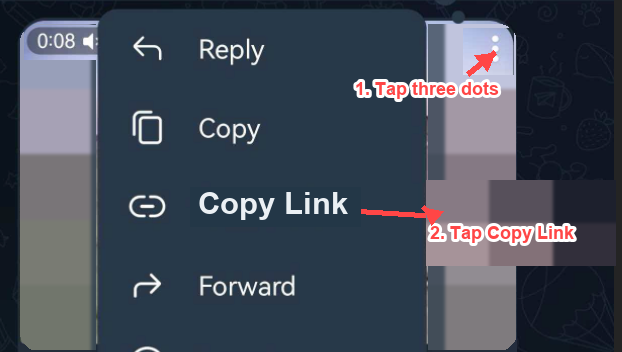
Paste Telegram Video Link
Detected an unfinished download "{filename}" ({progress}). Do you want to continue?
Continue this telegram video download in TG Downloader
Open the message in Telegram Web and keep the telegram video download moving with TG Downloader for files, albums, or private-channel saves.
Install TG Downloader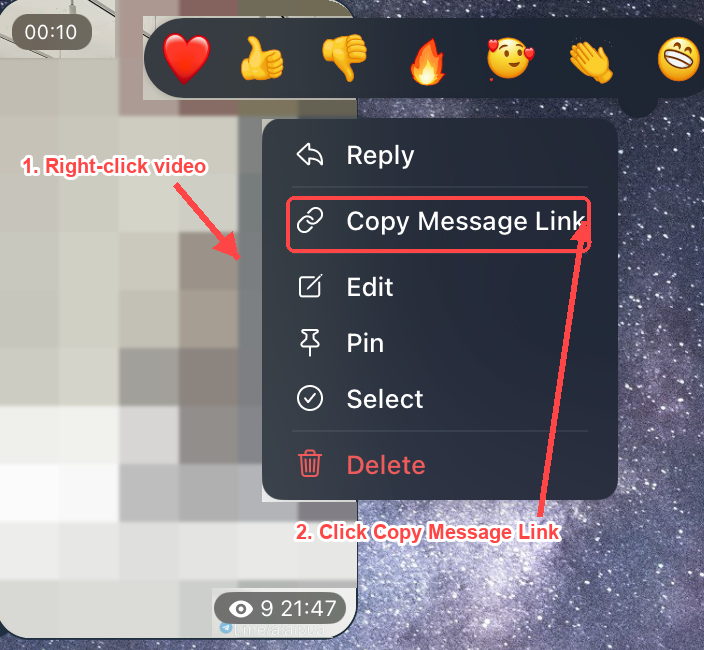

Chrome Extension
Dedicated extension for Chrome browser to capture Telegram media content with one click.
Install Extension
Edge Extension
Dedicated extension for Microsoft Edge, perfectly compatible with Telegram content downloading.
Install ExtensionTelegram channel blocked downloads? Save HD videos, images & files instantly — no root needed. Bypass restrictions in one click. Your content, your rules.
Website Access
Sign in to continue
By signing in, you agree to the Terms Privacy Policy
Your Daily Free Credits Are Ready!
Get more Credits
You can also download with the browser extension.
Install ExtensionWhen Telegram download is disabled on a channel, the download button disappears, the save-to-gallery option is greyed out, and forwarding is blocked. You're not doing anything wrong — the channel owner turned on a privacy setting. Below is the fastest workaround, followed by why it happens and every safe method ranked by reliability.
Why is download disabled in the first place?
Telegram gives channel owners a setting called "Restrict saving content" (Settings -> Channel -> Administrators -> Restrict Saving Content). When it's on, every subscriber is blocked from:
- Downloading media to their device
- Forwarding messages to other chats
- Copying text
- Taking screenshots (on some platforms)
Owners use it to protect original content — paid courses, exclusive media, leaked-prevention, or creator work they don't want re-uploaded elsewhere. Understanding this matters, because it tells you the "missing button" is intentional, not a bug, and the cleanest path is usually to respect the creator's intent.
Before you start: a 10-second check
Make sure it's actually a restriction, not a glitch:
- Update your app. Outdated clients sometimes hide buttons.
- Check your storage and permissions. A full device or a denied "Photos" permission can block saves and look like a restriction.
- Long-press the media. If you see no save/forward options at all (not even greyed out), the channel has "Restrict saving content" enabled.
If it's just a permissions or storage issue, fixing that solves everything — no workaround needed.
Workaround 1 — Ask the channel admin (highest success, zero risk)
Underrated, but the best first move. Many admins will happily send you a file directly or point you to an official download link.
- Tap the channel name -> Discussion / Contact or message the listed admin.
- Be specific: which post, and why you need it (offline study, personal archive).
- For paid/course channels, there's often an official portal where downloads are allowed.
Why it's first: It's the only method that always respects the creator and never breaks any rule. Surprisingly effective.
Workaround 2 — Try Telegram Desktop or Web
The restriction is enforced across Telegram's official clients, but rendering behavior differs by platform, and the desktop/web experience can make legitimate capture easier:
- Telegram Web (web.telegram.org): media plays in your browser. You can view it full-screen and capture what's on your own screen.
- Telegram Desktop (Windows/macOS/Linux): larger preview window, easier screen recording, better playback for long videos.
Note: Official clients honor the "restrict saving" flag, so a direct "Save" may still be blocked. The benefit here is a better surface for the viewing-and-capturing approach in Workaround 3 — not a magic bypass.
Workaround 3 — Screen recording (for personal viewing)
If you simply need a copy of something you're allowed to watch for personal, offline use, screen recording is the most accessible method.
- On a phone — iOS: Settings -> Control Center -> add Screen Recording. Open the media full-screen, start recording.
- On a phone — Android: Swipe down the Quick Settings panel -> Screen Record.
- On desktop — macOS: Shift + Cmd + 5.
- On desktop — Windows: Xbox Game Bar (Win + G) or the built-in Snipping Tool recording.
- For photos: a simple screenshot of the full-screen image is enough.
Important caveat: Screen recording captures content the creator chose to restrict. Keep it for personal use only — do not re-upload, redistribute, or sell it. That crosses into copyright and terms-of-service violations (see legal section).
Workaround 4 — Official "Saved Messages" trick (when forwarding is allowed)
Some channels restrict downloading but not forwarding. Quick test:
- Long-press the message -> look for Forward.
- If available, forward it to "Saved Messages" (your personal cloud chat).
- From Saved Messages, downloading is often re-enabled.
If forwarding is also blocked, this won't work — fall back to Workaround 1 or 3.
What about third-party bots and "downloader" tools?
Search results are full of bots and apps promising to "bypass restricted channels" or "download protected Telegram media." Be cautious. Here's the honest breakdown:
- Risk to your account: Many require your phone number, login code, or a full API session — handing that over can get your account banned or hijacked.
- Malware & scams: Unofficial APKs and "modded Telegram" apps are a common malware vector.
- They often don't work: Telegram patches these methods regularly; "protected content" is enforced server-side in many cases.
- Terms violation: Using tools to defeat the restriction can breach Telegram's Terms of Service.
Recommendation: Avoid handing credentials to any third-party "unlocker." If you only need personal access to viewable content, the screen-recording route achieves the same result without the account risk.
Is this legal / against the rules?
A straight answer:
- Viewing content you have legitimate access to is fine.
- Personal-use capture (screen recording for yourself) sits in a grey area but is generally low-risk as long as you don't redistribute.
- Re-uploading, sharing, or selling restricted content can infringe copyright and violates Telegram's Terms of Service — and may violate local law.
- The "Restrict saving content" flag is the creator's explicit signal that they don't want copies spread. Respect it.
This guide is for personal access and troubleshooting, not for redistributing someone else's protected work.
Comparison table: which method should I use?
| Method | Success rate | Account risk | Allowed? | Best for |
|---|---|---|---|---|
| Ask the admin | High | None | Yes | Files, paid content, courses |
| Telegram Desktop/Web | Medium | None | Yes | Better viewing & capture surface |
| Screen recording | High | None | Personal use only | Videos & images you can view |
| Forward -> Saved Messages | Medium | None | Yes (if forwarding on) | Channels that block only download |
| Third-party "unlocker" bots | Low-Medium | High | Often violates ToS | Not recommended |
How to access content when Telegram download is disabled on a channel
Step-by-step, safe workarounds to save or access media from a Telegram channel that has enabled "Restrict saving content," ordered from lowest risk to most situational.
- 01Confirm it is a restriction, not a glitch
Update the app, check device storage and Photos permission, then long-press the media. If no save or forward options appear at all, the channel has 'Restrict saving content' enabled.
- 02Ask the channel admin
Message the listed admin and request the specific file. Many admins will send it directly, and paid channels often have an official download portal. This is the highest-success, zero-risk option.
- 03Try Telegram Desktop or Web
Open the channel in Telegram Web or Telegram Desktop. The larger preview window and browser playback give you a better surface for legitimate, on-screen capture.
- 04Screen record for personal use
Use the built-in screen recorder (iOS Control Center, Android Quick Settings, macOS Shift+Cmd+5, or Windows Xbox Game Bar) to capture media you are allowed to view. For photos, a full-screen screenshot is enough. Keep captures for personal use only.
- 05Forward to Saved Messages (if forwarding is allowed)
Long-press the message and tap Forward. If available, forward it to your Saved Messages chat, where downloading is often re-enabled. If forwarding is also blocked, use an earlier step instead.
FAQ
Why can't I save videos from this Telegram channel anymore?
The admin enabled "Restrict saving content," which disables download, forward, and screenshots for all subscribers.
Can I bypass it without an app?
Yes — screen recording (built into iOS, Android, macOS, and Windows) captures what you can view, no extra app needed.
Will the channel owner know I recorded or screenshotted?
On most platforms, no notification is sent. But that doesn't make redistribution okay.
Are "Telegram download bot" services safe?
Treat them with suspicion. Any tool asking for your login code or API session can compromise your account. Avoid them.
Does Telegram Premium remove the restriction?
No. Premium adds features for you, but it does not override a channel owner's content-protection setting.
Bottom line
The "missing download button" is a deliberate creator setting, not a bug. The safe, effective path is: ask the admin first, use Desktop/Web for a better capture surface, and screen-record for personal use. Skip the sketchy third-party "unlockers" — they risk your account and rarely beat Telegram's server-side protection.